The short answer
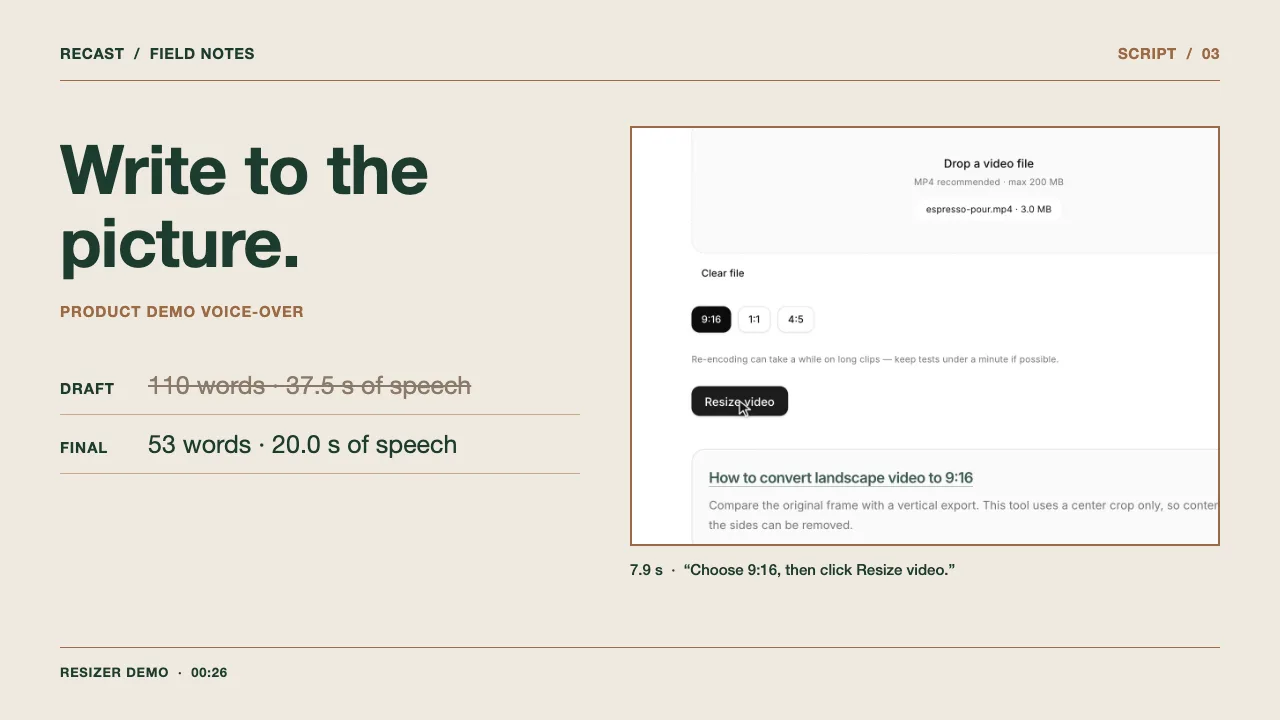
Write a product-demo voice-over after the picture is edited, one line per shot. For each line, note when the shot starts and ends, what the viewer sees, the exact words, and the labels or numbers that must not change. Use the words for what the picture cannot show on its own, such as a setting, a limit or the result. Then record or synthesize each line and compare its speech length with its shot. In our 26.3-second demo of the Recast video resizer, a first draft written before timing had 110 words and 37.5 seconds of speech, measured from the first to the last audible sound of each line. The final script has 53 words and 20.0 seconds of speech, and every line ends before the next shot or the end of the video.
1. Use a script table instead of a paragraph
A voice-over script for a product demo is easier to time as a table than as a block of prose. Give each shot its own row with the start and end time in the edited video, a plain description of what the viewer sees, and the exact words to record. Add a column for anything that must not change during editing or translation: button labels, product names, numbers and claims about what the product does. Then record the word count and the measured speech length, so you can compare each line with the shot it belongs to.
Download the blank CSV template below and open it in Google Sheets, Excel or Numbers. The filled example contains the final script of the Recast resizer demo in this guide, with the measured start and end of every spoken line. Keep one row per shot even when a shot needs no narration: an empty voice-over cell is a decision to let the picture speak.
| Template column | What to write | Shot 3 of the Recast resizer demo |
|---|---|---|
| Shot and time | Where the shot starts and ends in the edited video. | 3 · 7.9–11.2 s |
| On screen | What a viewer can see happen, written from the picture rather than from memory. | The 9:16 button is clicked, then the pointer moves to Resize video and clicks it. |
| Voice-over | The exact words to record, written the way numbers should be read aloud. | Choose 9:16, then click Resize video. |
| Must stay exact | Labels, names, numbers and product claims that editors and translators must check against the product. | 9:16 · Resize video |
| Words and speech length | The word count and the time from the first to the last spoken sound. | 6 words · 3.15 s of speech in a 3.3 s shot |
2. Record the demo, then list the shots
Write narration against the edited picture, not against a plan of the demo. On November 15, 2026, we recorded a real run of the free Recast 9:16 resizer in Chrome on a Mac, driven by a browser-automation script: open the tool, add an eight-second MP4, choose 9:16, click Resize video and wait for the download. On that test machine, encoding the eight-second clip took 15.5 seconds from the click to the download. We removed 11.4 seconds of that wait in the edit and labeled the cut on screen. The finished demo lasts 26.3 seconds.
Next we listed when each visible action happens. The shot boundaries in the table come from the recording log and the edit, not from estimates. The last shot plays the 16:9 input and the downloaded 1080 × 1920 file side by side, so a viewer can see which parts of the frame the center crop removed. This is a Recast team demonstration, not a customer video. The narration is a preset English voice from the MiniMax speech-2.8-hd model, the speech model the Recast translation pipeline uses, which we called through the RunningHub API for this test. Recast does not turn a typed script into a voice-over.
Read the final voice-over script
Here's how to turn a landscape clip into a vertical video. Drop in your MP4. Nothing gets uploaded. Choose 9:16, then click Resize video. It fills the vertical frame, crops the sides, and starts the download. Here's the 1080 by 1920 result. The sides are cropped, so keep your product near the center.
| Resizer demo shot | Edited time | What the viewer sees |
|---|---|---|
| 1 | 0.0–4.2 s | The Recast resize tool page; the pointer moves to the file drop area. |
| 2 | 4.2–7.9 s | espresso-pour.mp4 · 3.0 MB appears, and the page scrolls to the ratio buttons. |
| 3 | 7.9–11.2 s | 9:16 is clicked at 8.3 s; Resize video is clicked at 11.2 s. |
| 4 | 11.2–18.3 s | Loading video engine, then Encoding…; after the labeled cut, Download started. appears at 15.3 s. |
| 5 | 18.3–26.3 s | The 16:9 input and the downloaded 9:16 MP4 play side by side. |
3. Fit each line inside its shot
Our first draft followed the shot list but ignored timing. To measure it, we generated every line with the same preset MiniMax English voice at normal speed and timed it from the first to the last audible sound. All five lines ran longer than their shots: 110 words and 37.5 seconds of speech for 26.3 seconds of picture. Line 1 alone needed 7.5 seconds for a 4.2-second shot.
To shorten the script, we deleted what the picture already shows and kept what it cannot show. The page title already names the tool, so the opening became one sentence. The file name is on screen, so line 2 only adds that the free resizer does not upload the file; it processes the video in the browser. The 1080 × 1920 size and the cropped sides stay in the last line because a viewer could miss them. We also removed “Shorter clips finish faster,” a general claim the demo did not test. If a line cannot get shorter without losing a fact the viewer needs, hold the shot longer in the edit. The final script has 53 words and 20.00 seconds of speech. Each line starts 0 to 0.5 seconds after its shot begins. Lines 1 to 4 end 0.15 to 2.2 seconds before the next shot, and line 5 ends 1.4 seconds before the video ends.
| Resizer demo shot | Shot length | Rejected first draft: words · speech | Final line: words · speech |
|---|---|---|---|
| 1 | 4.2 s | “Need a vertical version of a landscape product video for TikTok or Instagram Reels? Here's how to make one with Recast's free resizer.” 23 words · 7.49 s | “Here's how to turn a landscape clip into a vertical video.” 11 words · 3.00 s |
| 2 | 3.7 s | “Drop in your MP4. The tool runs right in your browser, so the file stays on your device, and you don't need to sign up.” 25 words · 7.00 s | “Drop in your MP4. Nothing gets uploaded.” 7 words · 3.12 s |
| 3 | 3.3 s | “Pick the 9:16 ratio for Stories and Reels, then click Resize video.” 12 words · 4.34 s | “Choose 9:16, then click Resize video.” 6 words · 3.15 s |
| 4 | 7.1 s | “Recast scales the picture until it fills the vertical frame, crops off the sides, and re-encodes the clip. Shorter clips finish faster.” 22 words · 8.40 s | “It fills the vertical frame, crops the sides, and starts the download.” 12 words · 4.61 s |
| 5 | 8.0 s | “Here's the downloaded file: a 1080 by 1920 MP4. Because the sides are cropped, check that your product stays in the middle of the frame before you post.” 28 words · 10.27 s | “Here's the 1080 by 1920 result. The sides are cropped, so keep your product near the center.” 17 words · 6.12 s |
4. How many words fit in a 30-second voice-over?
No word count fits every 30-second video, because it depends on the voice, the pauses and how long the viewer should simply watch. As a calculated guide from two finished Recast demos, 30 seconds of video holds about 60 to 66 words. The 26.3-second Recast resizer demo uses 53 words, or 121 words per minute of video. The 24-second Recast espresso demonstration also uses 53 words, or 133 words per minute of video. Words per minute of video is the word count divided by the full video length, silent moments included; it is not the speaking rate.
Those 30-second figures are calculated from our two videos, not measured on a 30-second cut. The rejected first draft of the resizer demo shows the risk of writing first and timing later: its 110 words equal 251 words per minute of picture, and they took 37.5 seconds to say against 26.3 seconds of video. Numbers also take longer than their word count suggests. “Choose 9:16, then click Resize video.” has six words but took 3.15 seconds, because the voice reads 9:16 as “nine sixteen” and pauses at the comma.
To size your own script, read each line aloud at the speed you will record, or generate it with the voice you plan to use, and time it against its shot. Cut words until the line ends before the next action starts on screen.
| Recast example | Video length | Words | Voice from first to last word | Words per minute of video (words ÷ video length) |
|---|---|---|---|---|
| Resizer demo, final script (measured) | 26.3 s | 53 | 0.50–24.92 s | 121 |
| Espresso demonstration, English (measured) | 24.0 s | 53 | 0.66–22.33 s | 133 |
| 30-second video at the resizer demo’s density (calculated) | 30.0 s | about 60 | Not measured | 121 |
| 30-second video at the espresso demo’s density (calculated) | 30.0 s | about 66 | Not measured | 133 |
| Resizer demo, rejected first draft (measured line by line) | 26.3 s of picture | 110 | Not placed; 37.5 s of speech across five lines | 251; did not fit |
5. Mark what translators must keep
If the demo will be dubbed, the “must stay exact” column becomes a translator’s checklist. In our English-to-Spanish espresso demonstration, the first Spanish pass came from a local run of the Recast translation pipeline. The English line “Coffee flows from the spout into a metal cup below” names two objects the viewer can see. That first pass kept only the cup and dropped the spout. In our editing pass, which was not a native-speaker review, we restored it as “boquilla,” and the revised lines were synthesized again before the final mix.
Translated lines can also run longer than the picture allows. The last English line of the espresso demo has 13 words. The first Spanish pass used 16 words, and its subtitle ran to the final frame. The subtitle of the edited 14-word line clears at 23.29 seconds, before the 24-second picture ends. Across the whole script the edited Spanish has 54 words to the English 53, and its voice ends 0.7 seconds later.
Interface labels need a decision too. In the Spanish Recast interface, the Resize video button reads “Redimensionar video.” If you record the demo again in the Spanish interface, the Spanish narration should say “Redimensionar video.” If the English interface stays on screen, keep the English label “Resize video” in the Spanish narration, so viewers hear the words they see.
| English line in the espresso demo | Must stay exact or fit | First Spanish pass (local Recast pipeline run) | Edited Spanish dub |
|---|---|---|---|
| Coffee flows from the spout into a metal cup below. | spout · metal cup | El café cae en una taza metálica. | El café sale por la boquilla y cae en la taza de metal. |
| Before sharing a translated version, review the wording and check the subtitle timing. | Fit before the 24.0 s picture ends | Antes de compartir una versión traducida, revise la redacción y compruebe la sincronización de los subtítulos. (16 words; subtitle ends at 24.0 s) | Antes de compartir la traducción, revise el texto y los tiempos de los subtítulos. (14 words; subtitle ends at 23.29 s) |
6. Can I use the voice-over script as subtitles?
Use the script as the caption text, but take the timing from the recorded voice. A script line has no start or end time, and one line can contain two sentences that a viewer should read separately. The five-line script of the Recast resizer demo became seven caption cues. We split lines 2 and 5 at pauses measured in the recording and timed every cue from the first to the last spoken sound, with a short hold before the next cue.
The free Recast subtitle converter changes SRT, WebVTT and plain-text files. Given a plain-text script, it gives every non-empty line the same three-second cue starting at zero; it does not time cues to the recorded voice, so treat those times as placeholders. Recast Studio transcribes the speech in an existing video and creates timed subtitles for each translated version it produces; it does not take a typed script as input. For this demo we wrote the SRT from the measured times, then made the WebVTT file with the same conversion code the free converter uses. Both downloads contain the same seven cues. The demo MP4 has no subtitles burned into the picture; the player above loads the WebVTT file as an optional track.
6
00:00:18,800 --> 00:00:22,077
Here's the 1080 by 1920 result.

7
00:00:22,177 --> 00:00:25,174
The sides are cropped, so keep
your product near the center.
7. Check the script before you record
Run the last check against the edited video, not against the shot list. If you change the picture after recording, retime the script and the captions together. A cut that moves an action by half a second can leave a correct sentence describing the wrong moment.
- Every line ends before the next action starts on screen.
- Button labels, menu names and numbers match the version of the product in the recording.
- Claims the picture cannot prove are true for the tool on screen. In our demo, “Nothing gets uploaded” is true because the free resizer processes the file in the browser.
- Numbers are written the way the voice should read them, for example “1080 by 1920.”
- Words a translator must keep are marked, and lines that will be translated leave room to grow.